

If you want to successfully outsource virtual assistant support, start by identifying 3–5 high-leverage, repeatable tasks you can delegate immediately. The right move is to partner with a managed virtual assistant agency that handles the vetting and matching for you, saving you time and ensuring consistency. This is how you reclaim hours for strategic work, stop context switching, and ensure fewer critical tasks get dropped. If you’re a founder or business operator drowning in inbox management and administrative tasks while trying to grow, this guide is for you.
Summary (TL;DR)
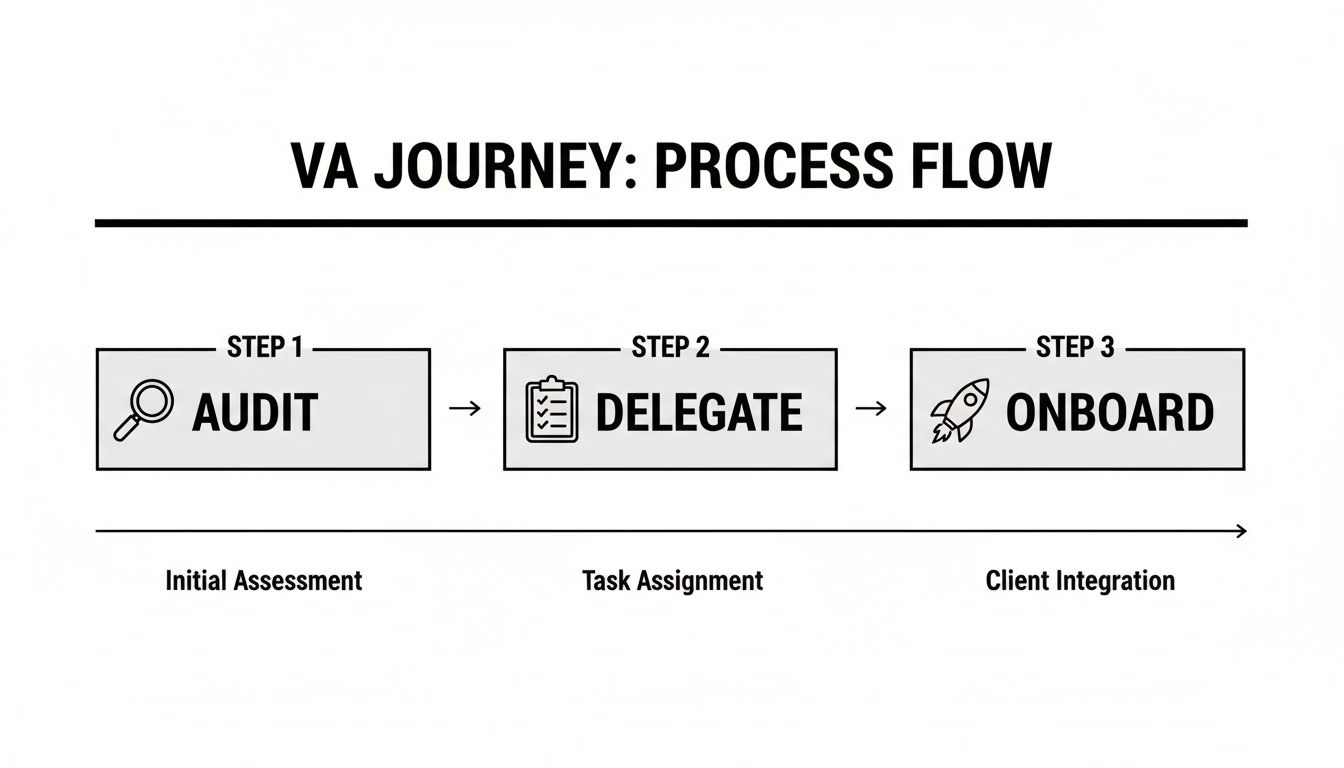
- What to do first: Audit your tasks for one week. Identify 3-5 time-consuming, repeatable tasks that don't require your direct oversight. This is your starting point.
- What to delegate initially: Focus on process-driven work like inbox filtering, calendar management, basic social media scheduling, and CRM data entry.
- What to expect: The first 1-2 weeks are for training and syncing. By day 30, your VA should manage initial tasks with minimal oversight, freeing up 5-10+ hours of your time per week.
- Common pitfalls to avoid: Vague instructions ("manage my email") and inconsistent communication will lead to failure. Be specific and establish a clear check-in cadence.
- Quick timeline: Working with a managed service like Match My Assistant can get you matched with a vetted VA in about a week, compared to the 4-8 weeks needed for a full-time hire.
Key Takeaways
- Focus on Outcomes, Not Just Tasks: The goal is to delegate entire processes like inbox management, scheduling, and reporting to free up your strategic time.
- Agency vs. Freelancer: A virtual assistant agency brings vetted talent, backup support, and a structured process to the table, saving you recruiting headaches and reducing risk.
- Start Small, Then Scale: Begin with 3–5 clearly defined tasks. This builds trust and helps you dial in your workflow before you hand over more complex responsibilities.
- Clarity Is King: Your success hinges on crystal-clear instructions, a solid “Definition of Done” for each task, and consistent communication from day one.
- It’s an Investment in Focus: Think of it this way: you’re minimizing the administrative drag that holds you back, so you can focus on the high-impact work only you can do.
Quick Answers
What should I delegate first?
Start with repetitive, low-risk administrative tasks like calendar management, inbox filtering, data entry, or scheduling appointments. These provide quick wins and build trust.
How long does it take to get started?
With a managed service, you can be matched and onboarded with a fully vetted VA, often within 7-10 business days, bypassing the lengthy in-house hiring process.
Is it secure to give a VA access to my accounts?
Yes, if you follow best practices. Use a password manager, grant role-based permissions (principle of least privilege), and work with a reputable agency with confidentiality agreements in place.
At Match My Assistant, we specialize in helping busy professionals delegate routine and specialized tasks through vetted support and a clear onboarding process. Our goal is to bring clarity and consistency to your operations, getting work off your plate without the churn of random freelancers. We back our process with a satisfaction guarantee to ensure you feel confident from day one.
Step-by-Step Playbook: Onboarding Your Virtual Assistant

A successful partnership is built on a structured foundation. This playbook ensures you and your new virtual assistant are aligned from day one, minimizing confusion and maximizing productivity.
-
Task Selection: Identify Your Delegation Priorities
Before you even think about hiring, conduct a one-week "task audit." Write down every administrative or operational task that pulls you away from core work. From that list, select 3-5 repeatable, high-leverage tasks to delegate first. Perfect candidates include inbox management, scheduling, or CRM updates. -
Task Briefing: Define What "Done" Looks Like
For each task, create a simple brief. Vague requests lead to poor outcomes. A good brief includes the goal, a clear "Definition of Done," required tools, and examples. This simple document is the single most important factor for getting work done right the first time. -
Access & Security: Grant Permissions Securely
Never share your primary passwords. Use a password manager like LastPass or 1Password to provide secure access. Follow the principle of least privilege: grant only the permissions necessary for the task. Enable two-factor authentication (2FA) on all critical accounts and use separate logins wherever possible to maintain a clear audit trail. A professional virtual assistant agency will have processes for this. -
Onboarding Week: The First 7 Days
The first week is about building rapport and mastering core tasks, not overwhelming your VA.- Week 1: Assign just 1-2 of your prioritized tasks. Schedule brief, 15-minute daily check-ins to answer questions and provide immediate feedback. The goal is to build confidence.
- Week 2: Introduce a third, slightly more complex task. Transition to check-ins every other day. Encourage your VA to solve minor, predictable issues independently.
- First 30 Days: By the end of the month, your VA should be handling the initial tasks with minimal oversight. Shift to a single 30-minute weekly sync to review progress and plan the week ahead.
-
Cadence & Communication: Establish a Rhythm
Define how you’ll communicate. Use synchronous tools (video calls) for weekly planning and feedback sessions. Use asynchronous tools (Slack, email) for daily updates and quick questions. This protects your focus time and gives your VA the clarity they need. -
QA & Feedback: Create a Learning Loop
Delegation is a partnership, not a one-time handoff. In the beginning, review completed work to ensure it meets your standards. Provide specific, constructive feedback. Instead of "this is wrong," try "Great start. Next time, let's format the report this way for consistency." This helps your VA learn your preferences quickly. -
Scaling the Relationship: Delegate Outcomes, Not Just Tasks
Once your VA masters the initial tasks, start delegating outcomes. Instead of "schedule these three meetings," the instruction becomes "own the scheduling for all Q4 client calls." This shift empowers your assistant to be a true operational partner, not just a task-doer. This is the ultimate goal when you hire a virtual assistant.
Delegation Assets: Templates and Checklists to Get Started
Clarity is the foundation of successful delegation. Use these copy-paste assets to eliminate guesswork and set your remote executive assistant up for success.
Task Brief Template
- Goal: What is the "why" behind this task? (e.g., "Schedule Q3 client check-in calls to maintain strong relationships.")
- Definition of Done: How will we know this is 100% complete? (e.g., "All 15 clients have confirmed appointments in my Google Calendar.")
- Inputs/Links: Provide all necessary resources. (e.g., "Client list spreadsheet, my Calendly link, CRM login.")
- Tools: What software is required? (e.g., "Google Calendar, Gmail, HubSpot.")
- Constraints: Are there any rules or things to avoid? (e.g., "Do not schedule meetings before 9 AM ET.")
- Examples: Show, don't just tell. (e.g., "Here’s how a similar calendar invite looked last quarter.")
- Deadline: When is this due? (e.g., "End of day Friday.")
- Escalation Rules: What should they do if they get stuck? (e.g., "If a client doesn't respond after two emails, flag it for me in Slack.")
SOP / Checklist Template (Simple)
SOP: Weekly Social Media Scheduling
- Open the "Approved Content" Google Doc.
- Select three posts for the upcoming week (Mon/Wed/Fri).
- Create graphics in Canva using the brand templates.
- Write captions for each post, using our approved hashtag list.
- Upload graphics and captions into the scheduling tool.
- Schedule posts to publish at 10 AM ET.
- Tag any relevant partners mentioned in the posts.
- Update the content calendar spreadsheet to "Scheduled."
- Send a summary of the week's scheduled posts via Slack for final review.
- Monitor posts for comments for the first hour after they go live.
Communication Cadence Template
- Daily Asynchronous Check-In (via Slack):
- What I completed yesterday.
- What my priorities are today.
- Any roadblocks or questions.
- Weekly Synchronous Review (15-Minute Video Call):
- Review last week's performance against goals.
- Set priorities for the upcoming week.
- Discuss any process improvements or challenges.
Task Examples: What to Delegate to Your Virtual Assistant
Use this list to identify quick wins for delegation. For a deeper look at our capabilities, explore our virtual assistant services.
- Manage and filter email inbox to surface priorities
- Schedule appointments and manage your calendar
- Book business and personal travel
- Perform online research and synthesize findings
- Create and format presentations or reports
- Schedule and publish social media content
- Handle first-tier customer service inquiries
- Update your CRM with leads and notes
- Prepare and send invoices to clients
- Transcribe meeting notes and identify action items
- Format and publish blog posts
- Manage and organize digital files (e.g., Google Drive)
- Create basic graphics for social media or blogs
- Coordinate with vendors and contractors
- Process expense reports
- Place online orders for supplies or personal items
- Manage event and webinar registrations
Measurement & ROI: How to Know It’s Working

Delegation is an investment in your focus. A simple framework for measuring success ensures you're getting a clear return. This isn't about micromanagement; it's about confirming that you are freeing up time for high-value work.
Suggested KPIs
Track a few simple metrics to gauge impact:
- Hours Saved per Week: The primary metric. How many hours of your own time did you reclaim?
- Task Turnaround Time: How quickly are tasks completed from assignment to delivery?
- % Tasks Done Without Rework: A high percentage indicates clear instructions and a competent VA.
- Backlog Size: Is your administrative to-do list shrinking?
- Time-to-Independence: How long does it take for your VA to manage a process with minimal oversight? This is the ultimate goal.
A Simple ROI Framing
The return on investment (ROI) from a VA isn't just about cost savings. It's about leveraging your time.
(Hours Saved × Your Hourly Value) – VA Cost = True ROI
If delegating a $35/hour task frees you up for a $300/hour strategic activity, the ROI is massive. It's about trading low-value work for high-impact results. For more details on what to expect, check out our plans and pricing.
30-Day Success Scorecard Checklist
Use this checklist at the end of the first month to evaluate progress:
- Core tasks (3-5) are being completed consistently and on time.
- I am spending less than one hour per week on active management.
- My focus on strategic, high-value work has tangibly increased.
- My VA communicates proactively, providing updates and asking clarifying questions.
- Our established systems (SOPs, communication cadence) are being followed.
- Fewer administrative tasks are falling through the cracks.
- I feel confident in my VA's ability to handle their responsibilities.
FAQs: Your Questions Answered
What tasks should I delegate first?
Start with repetitive, low-risk administrative work to build trust and momentum. The best initial tasks are inbox filtering, calendar management, data entry, and appointment scheduling. These provide immediate time savings and help establish a smooth workflow.
How do I give access securely?
Never share your master passwords. Use a password manager (LastPass, 1Password) to grant access. Follow the principle of least privilege—give only the permissions needed for the job. Create separate user logins in tools like Google Workspace or Microsoft 365 whenever possible.
What’s the difference between a virtual assistant and an executive assistant?
A general Virtual Assistant (VA) is typically task-focused, executing specific, defined processes. A remote Executive Assistant (EA) is a strategic partner who proactively manages your time, priorities, and workflow to maximize your effectiveness. At Match My Assistant, our focus is on finding you that true EA partner.
Dedicated VA vs pooled team—what’s better?
For busy professionals, a dedicated VA is almost always superior. A dedicated assistant learns your preferences, anticipates your needs, and can handle complex, context-rich work. A pooled team, where tasks are assigned to whoever is free, is suitable only for simple, one-off tasks and requires constant re-explanation.
How does onboarding work and how long does it take?
A structured onboarding process is critical. With a managed service, you can be matched and onboarded within a week. The first 30 days focus on mastering 3-5 core tasks, establishing a communication rhythm, and building a trusted working relationship. Find out more about how our matching process works.
What happens if my assistant is unavailable?
This is a key benefit of using a virtual assistant agency over a solo freelancer. Agencies like Match My Assistant provide built-in backup support. If your dedicated assistant is sick or on vacation, a trained backup assistant can step in to ensure your critical tasks continue without interruption.
Is a VA better than hiring in-house for my situation?
A VA is often a smarter choice for growing businesses. It’s ideal when you don't have 40 hours/week of work, need to move faster than a traditional 4-8 week hiring cycle, and want to avoid the overhead costs (benefits, payroll taxes, equipment) of a full-time employee. It offers scalable, expert support without the long-term commitment.
Ready to stop juggling everything and focus on work that truly drives growth? Match My Assistant connects busy professionals with dedicated, vetted virtual assistants who match their specific needs and work style. Request a quote to discover how our flexible support options can help you reclaim your time.