

The fastest way to grow your business is to stop doing everything yourself. A virtual assistant (VA) is a remote professional who handles your routine and specialized tasks, giving you back the time to focus on strategic growth. The key is to start by delegating 3-5 high-volume, repeatable tasks to a vetted professional who can execute them reliably.
If you’re a founder drowning in your inbox, a small business owner swamped with admin, or an ops manager trying to build scalable systems, this guide is your starting point.
Key Takeaways
- Start Small, Win Big: Begin by delegating 3-5 simple, repeatable tasks like inbox management or scheduling to build trust and momentum.
- Systems Trump Instinct: Use templates for task briefs and checklists (SOPs) to ensure clarity and consistency from day one.
- Choose Your Model Wisely: A virtual assistant agency provides vetting, backup support, and guided onboarding, saving you the management overhead of freelance marketplaces.
- The First 30 Days are Crucial: Use this period for focused training and feedback to establish a solid communication rhythm and clear expectations.
- Measure What Matters: Track hours saved per week and task turnaround time to see the clear Return on Investment (ROI) of effective delegation.
- Security is Non-Negotiable: Use a password manager and the principle of least privilege to grant access to tools securely.
Quick Answers
| Question | Answer |
|---|---|
| What is a virtual assistant? | A VA is a remote professional who provides administrative, technical, or creative assistance to clients from their own office. |
| What can a VA do? | Common tasks include email and calendar management, data entry, social media scheduling, online research, and customer support. |
| How do I get started? | Identify 3-5 repetitive tasks, document them clearly using a template, and partner with a service that vets assistants for you. |
| Is it cost-effective? | Yes. You avoid the costs of a full-time employee, such as benefits, office space, and equipment, while gaining flexible support. |
| What's the difference between a VA and an EA? | A VA typically handles defined tasks for one or more clients, while an Executive Assistant (EA) offers strategic, dedicated support to a single leader. |
Summary (TL;DR)
For busy leaders who need the bottom line, here is your high-level plan for getting started with a virtual assistant.
- What to Do First: Identify 3–5 high-volume, low-risk tasks that eat up your time. Think inbox management, scheduling, or data entry.
- What to Delegate: Start with administrative (calendar), marketing (social media scheduling), and operational (updating a Customer Relationship Management system, or CRM) tasks.
- What to Expect: A managed VA service like Match My Assistant provides a vetted, reliable professional. Expect a structured onboarding process and a satisfaction guarantee.
- Common Pitfalls to Avoid: Vague instructions, sharing passwords insecurely, and trying to delegate everything at once. Lack of clear documentation is the #1 reason delegation fails.
- Quick Timeline: Expect to be matched with a VA in under a week. The first 30 days are focused on training, feedback, and building a communication rhythm.
Step-by-Step Playbook
Great delegation doesn't just happen—it’s a system you implement. Follow this 7-step playbook to integrate a virtual assistant smoothly, build trust, and ensure they become a productive extension of your team.
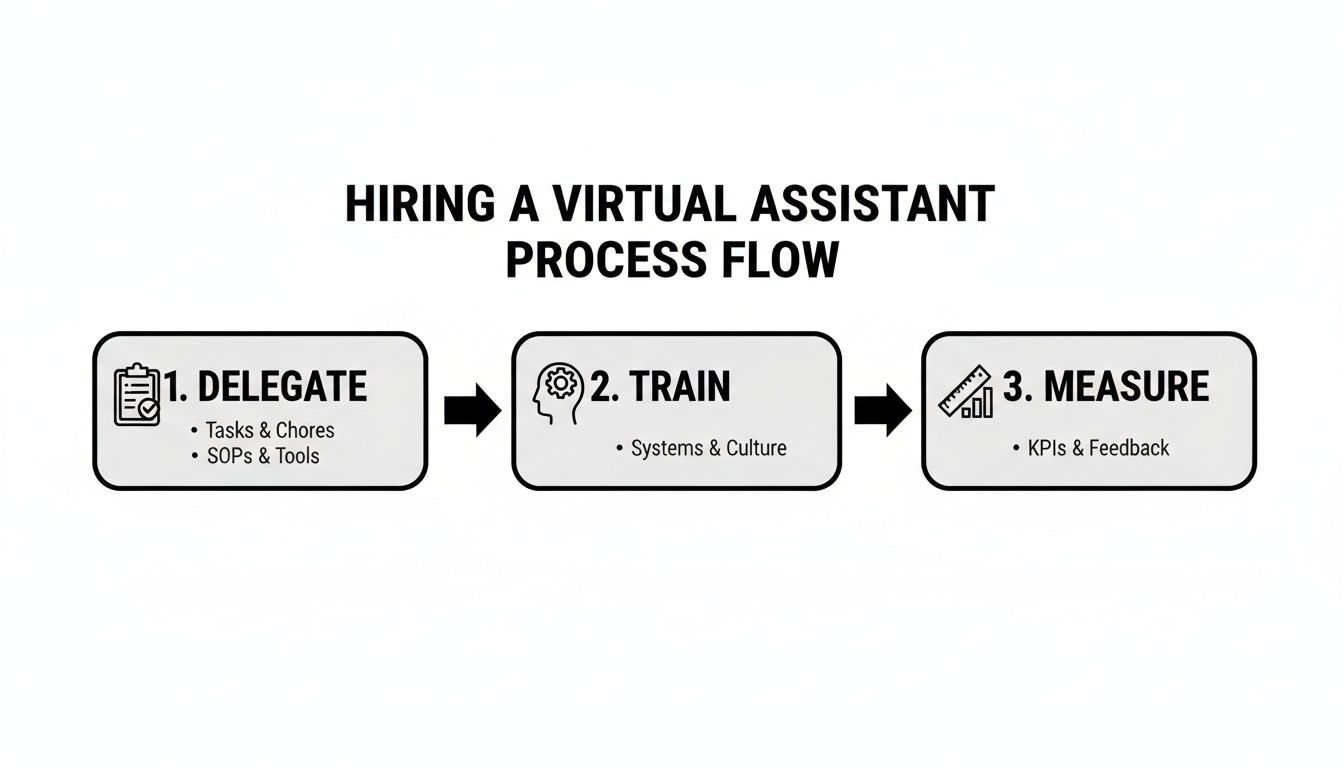
- Task Selection: Choose 3–5 high-volume, rule-based tasks to start. Good candidates are repetitive and don't require deep strategic context. Examples: filtering your inbox, scheduling meetings, or updating your CRM.
- Task Briefing: For each task, create a one-page brief. Clearly define the goal, what "done" looks like, and the tools required. Ambiguity is the enemy of successful delegation.
- Access & Security: Grant access to tools securely. Use a password manager like LastPass or 1Password—never share master passwords via email. Follow the principle of least privilege: grant access only to what is necessary for the task and enable Two-Factor Authentication (2FA) everywhere.
- Onboarding Week: The first 7 days set the tone. Conduct a kickoff call to align on goals and communication style. Record a video walkthrough of the first task so your VA has a reference. Schedule brief, 15-minute daily check-ins for the first week.
- Cadence & Communication: Establish a predictable communication rhythm. After the first week, shift from daily calls to a single 30-minute weekly sync. Use async tools like Slack for daily updates and questions.
- QA & Feedback: Review your VA’s work consistently, especially at the start. Provide specific, constructive feedback. Frame it as collaboration ("Next time, let's try X, because…") to build confidence.
- Scaling the Relationship: Once your VA masters the initial tasks and operates with minimal oversight (usually within 30 days), begin delegating more complex responsibilities or give them ownership of an entire process, like managing your weekly newsletter.
Your First 30 Days Onboarding Timeline
- Week 1: Your goal is to introduce your VA to your tools and delegate the first 1–2 tasks. Provide recorded walkthroughs and hold daily 15-minute check-ins.
- Week 2: Delegate 2–3 more tasks using clear briefs. Shift to async daily updates and provide detailed feedback on completed work. The VA should start documenting the process in a simple checklist.
- First 30 Days: Your VA should be managing all initial tasks with minimal supervision. Move to one weekly sync meeting and empower them to handle routine issues independently.
By following this playbook, you build a reliable system that gets work off your plate without the churn of hiring random freelancers. For more tips, explore our guide on how to manage remote teams.
Delegation Assets (Templates + Scripts)
The secret to effective delegation is clarity. Vague instructions lead to missed expectations and wasted time. These copy-paste templates are the practical building blocks for a system that reliably gets work done right the first time.

Task Brief Template
Use this one-page brief for every new task you delegate to ensure perfect alignment.
- Goal: Why are we doing this? (e.g., "Triage all new sales inquiries from the main inbox within 4 hours.")
- Definition of Done: What does 100% complete look like? (e.g., "The lead is logged in the [Tool] CRM, assigned to a sales rep, and an intro email template has been sent.")
- Inputs/Links: What is needed to start? (e.g., "Link to main inbox, CRM login, email templates folder.")
- Tools: What software is required? (e.g., "Gmail", "Salesforce", Slack.)
- Constraints: Are there any rules or things to avoid? (e.g., "Do not contact leads outside of business hours 9 AM–5 PM [City] time.")
- Examples: Show, don't just tell. (e.g., "Here is a Loom video of me doing this twice.")
- Deadline: When is it due? (e.g., "Daily by 4 PM EST.")
- Escalation Rules: Who to ask for help and when? (e.g., "If a lead asks a technical product question, escalate to [Role] in the #sales Slack channel.")
SOP / Checklist Template
For any recurring task, a simple Standard Operating Procedure (SOP) ensures consistency.
- Task Name: Weekly Social Media Scheduling
- Objective: Schedule all approved content for the upcoming week.
- Step 1: Open the "Approved Content" Google Sheet.
- Step 2: Log in to Buffer.
- Step 3: For each day, copy the post text and download the corresponding image from Drive.
- Step 4: Create a new post in Buffer, paste the text, and upload the image.
- Step 5: Select the correct social channels (LinkedIn, Twitter).
- Step 6: Schedule for the date and time specified in the Google Sheet.
- Step 7: Double-check the post in the Buffer calendar view.
- Step 8: Mark the row as "Scheduled" in the Google Sheet.
- Step 9: If an image is missing or text is unclear, tag [Role] in Asana for clarification.
- Step 10: Repeat for all posts for the week.
Communication Cadence Template
A structured communication plan prevents micromanagement and empowers your assistant.
- Daily Async Check-in (via Slack):
- What I completed yesterday.
- What my top 3 priorities are for today.
- Any roadblocks or questions.
- Weekly Sync (15-Minute Call):
- Agenda 1 (5 mins): Review last week's KPIs and completed tasks.
- Agenda 2 (5 mins): Confirm priorities for the upcoming week.
- Agenda 3 (5 mins): Discuss any process improvements or challenges.
"What to Delegate" Task List
Here are 20 common tasks perfect for delegating to a virtual assistant:
- Manage and filter your email inbox.
- Schedule meetings and appointments.
- Book business travel and create itineraries.
- Perform data entry and clean up spreadsheets.
- Prepare and format reports or presentations.
- Handle basic expense reporting.
- Schedule social media content with tools like Hootsuite.
- Conduct online research for projects or competitors.
- Build targeted lead lists.
- Update your CRM (HubSpot, Follow Up Boss).
- Format and send your email newsletter.
- Provide frontline customer support via email or chat.
- Create simple graphics in Canva.
- Create and maintain SOP documentation.
- Manage project timelines in tools like Asana or Trello.
- Transcribe audio from meetings or videos.
- Follow up with vendors or clients.
- Post job descriptions to hiring platforms.
- Manage personal tasks like ordering gifts or making reservations.
- Monitor industry news and create summary reports.
Measurement & ROI
How do you know if hiring a VA is actually working? Success is more than just a cleared-out to-do list. By tracking a few key metrics, you can objectively measure the impact on your time, focus, and bottom line.
Suggested KPIs
Track these Key Performance Indicators (KPIs) to measure success without getting lost in spreadsheets.
- Hours Saved/Week: The most direct measure of value. How much of your time is being reclaimed?
- Task Turnaround Time: How quickly are routine tasks completed from assignment to delivery?
- % Tasks Done Without Rework: A high percentage indicates clear communication and a capable assistant.
- Backlog Size: Is that nagging list of admin tasks finally shrinking?
- Time-to-Independence: How long until your VA runs a task from start to finish with minimal oversight?
Simple ROI Framing
Use this formula to calculate the financial return of delegating your work.
(Hours Saved Per Week × Your Hourly Value) – Weekly VA Cost = Net Value Gained
For example, if you save 10 hours per week and value your time at $200/hour, that's $2,000 in reclaimed value. Subtract the weekly VA cost, and the positive result is your net ROI. This shifts the focus from cost to investment. See our guide to virtual assistant rates for more details.
30-Day Scorecard Checklist
Use this checklist at the end of the first month to evaluate your progress.
- The initial 3–5 delegated tasks are completed consistently.
- We have established a clear and effective communication rhythm.
- My VA can handle at least one core process without my involvement.
- I have saved a measurable number of hours this month (e.g., 5+ hours/week).
- My administrative backlog has noticeably decreased.
- I feel confident giving my VA new, more complex tasks.
- We have documented at least one recurring task in a simple SOP.
FAQs
Here are concise answers to the most common questions from busy professionals considering a virtual assistant.
What tasks should I delegate first?
Start with high-volume, low-risk, and easily documented tasks. Good examples include inbox filtering, calendar management, scheduling social media posts, and basic data entry. The goal is to build trust and a working rhythm before moving to more complex responsibilities.
How do I give access securely?
Never share master passwords. Use a password manager like 1Password to grant shared access securely. Always follow the principle of least privilege, giving access only to what is necessary. Create separate user accounts with limited permissions whenever possible and enforce Two-Factor Authentication (2FA).
What’s the difference between a virtual assistant and an executive assistant?
A Virtual Assistant (VA) typically handles a wide range of defined tasks and processes, often for multiple clients. An Executive Assistant (EA), even when remote, provides dedicated, high-level strategic support to a single leader, acting as a gatekeeper and strategic partner.
Dedicated VA vs pooled team—what’s better?
A dedicated VA works with you consistently, learning your preferences and business over time. This is ideal for leaders who need a reliable, long-term partner. A pooled team, where any available person handles your task, is better suited for simple, one-off jobs where personal context doesn't matter. For consistency, dedicated is superior.
How does onboarding work and how long does it take?
A good onboarding process takes about 30 days. Week 1 focuses on training on core tools and the first 1-2 tasks. By the end of the first month, your VA should manage their initial set of tasks with minimal supervision. A managed service like Match My Assistant provides a structured onboarding framework to ensure success.
What happens if my assistant is unavailable?
This is a key advantage of working with a virtual assistant agency. If your primary VA is sick or on vacation, the agency can provide a trained backup assistant to ensure your critical tasks continue without interruption. This safety net is something you don't get with a freelance marketplace.
Is a VA better than hiring in-house for my situation?
A VA is ideal for businesses that need flexible, scalable support without the high overhead (salary, benefits, office space) of a full-time employee. An in-house hire is better when you require a physical presence in the office and are prepared for the financial and administrative commitment of a direct employee.
If you’re ready to reclaim your time with reliable, vetted support, the team at Match My Assistant is here to help. We connect you with the perfect virtual assistant for your specific needs, backed by a clear process and a satisfaction guarantee. Request a quote today and discover how much more you can accomplish.