

To get your focus back on growth, delegate 3–5 recurring administrative tasks to a reliable virtual assistant service. The fastest path is to identify high-volume, low-complexity work like inbox management or scheduling and hand it off through a managed agency that handles the vetting for you. This frees you up for strategy, reduces context switching, and ensures critical tasks no longer fall through the cracks. If you’re a founder, operator, or manager drowning in admin while trying to grow your business, this playbook is for you.
Summary (TL;DR)
Dipping your toes into outsourced support can seem like a huge undertaking, but the core idea is simple: get your time back so you can focus on strategy. Working with a virtual assistant agency like Match My Assistant gives you a proven framework for delegation, so you can skip the trial-and-error that comes with sifting through freelance marketplaces. The secret isn't just finding another pair of hands; it's about building clear processes to get work off your plate consistently and reliably, backed by our satisfaction guarantee.
Key Takeaways
- Start Small & Specific: Begin by delegating 3-5 high-volume, low-risk tasks like calendar management, inbox filtering, or travel booking to get immediate time back.
- Define "Done": Use a simple Task Brief for every major request. Clarity upfront prevents miscommunication and ensures work is completed to your standard without rework.
- Trust But Verify: Grant access securely using a password manager and role-based permissions. Never share primary login credentials.
- Onboarding is a Process: Expect a 30-day ramp-up. Week 1 is for tool access and one core task. By Week 4, your VA should run initial tasks with minimal oversight.
- Measure What Matters: Track hours saved per week and "time-to-independence"—how quickly your VA can manage tasks without your input.
- Avoid Common Pitfalls: Don't under-delegate out of a fear of losing control. The biggest mistake is not having documented processes (SOPs); create them as you delegate.
Quick Answers
What are the primary virtual assistant services?
Most VAs handle administrative tasks (scheduling, email), operations support (data entry, SOP creation), marketing support (social media scheduling), and executive assistance (travel booking, research).
How do I give a VA secure access to my accounts?
Use a password manager like LastPass or 1Password to share access without revealing passwords. Always enable two-factor authentication (2FA) for an extra layer of security.
What's the difference between a VA and an EA?
A Virtual Assistant (VA) is typically task-focused (e.g., "schedule these posts"). A remote Executive Assistant (EA) is more strategic, anticipating needs, managing your time, and acting as a gatekeeper.
Step-by-step playbook
Bringing a virtual assistant into your world doesn't just happen—at least, not successfully. It’s a process. You need a game plan to smoothly hand off tasks, set clear expectations from the get-go, and build a relationship that actually lasts. This isn't about guesswork; it's a step-by-step playbook to get results from day one.
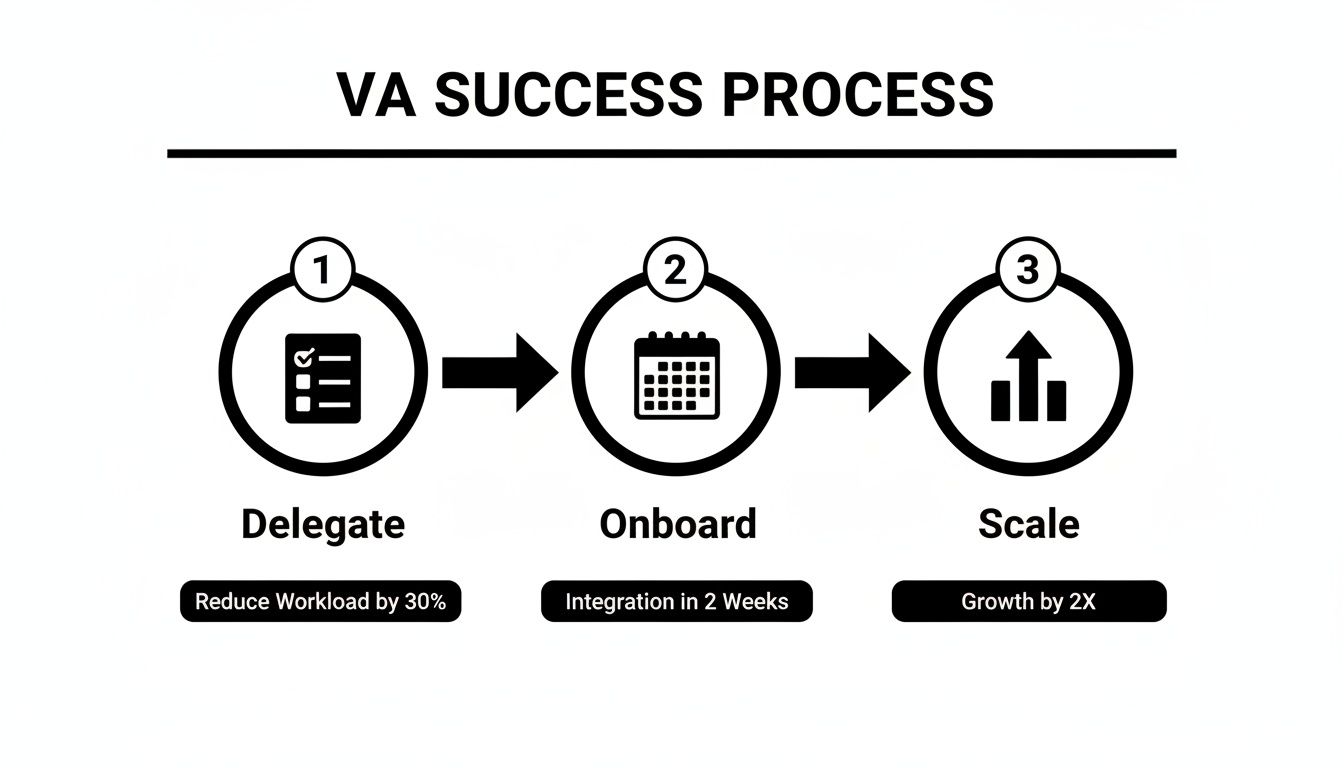
This cycle is key. Success isn't just about the initial hire. It’s about intentional delegation, a structured onboarding, and then strategically scaling the partnership. That’s how you build real trust and efficiency.
-
Task Selection: Before you hire, identify 3-5 high-volume, low-complexity tasks that drain your time but don't require your unique expertise. Good candidates include calendar management, inbox filtering, data entry, and travel booking. Make a list and prioritize by time spent and mental energy drained.
-
Task Briefing: Ambiguity is the enemy of delegation. For every major task, create a simple brief outlining the Goal, Definition of Done, Tools required, and any Constraints. This upfront clarity saves hours of back-and-forth later.
-
Access & Security: Security is non-negotiable. Use a password manager like LastPass or 1Password to grant access without sharing credentials. Apply the principle of least privilege: give your VA access only to what they absolutely need. Always enable two-factor authentication (2FA).
-
Onboarding Week: A great partnership starts with a structured onboarding. Don't throw your new assistant in the deep end.
- Week 1: Introduce your VA to key tools and communication channels (e.g., Slack). Walk them through the first priority task using your brief.
- Week 2: Provide clear feedback on Task #1 and introduce a second task. Ask them to begin documenting the process for the first task in a Standard Operating Procedure (SOP).
- First 30 Days: Gradually pull back oversight on initial tasks as they demonstrate proficiency. Introduce a third task and schedule a 30-day check-in to review progress and goals.
-
Cadence & Communication: Define your communication rhythm immediately. A daily asynchronous check-in (a quick Slack message) and one 15-minute synchronous call per week is an effective model to stay aligned without adding meeting overhead.
-
QA & Feedback: Create a simple, consistent feedback loop. This isn't micromanagement; it's quality assurance. A quick review of recurring deliverables or a weekly check-in on progress ensures standards are met and builds a culture of continuous improvement.
-
Scaling the Relationship: Once your VA masters the initial tasks and you've built trust, it's time to scale. Delegate more complex responsibilities, involve them in larger projects, and eventually hand over ownership of entire operational workflows. This is how you transform a VA from a task-doer into a strategic partner.
Delegation assets (templates + scripts)
Saying "just handle it" isn't delegation—it's a recipe for confusion. The secret to effective delegation is creating crystal-clear, repeatable systems that leave no room for guesswork. Use these templates to spell out exactly what you need.

Task Brief Template
- Goal: What is the primary objective of this task? (e.g., Schedule Q3 performance reviews with all 10 direct reports.)
- Definition of Done: What does a perfectly completed task look like? (e.g., All 10 meetings are confirmed on my calendar, each with a Zoom link and agenda attached.)
- Inputs/Links: Provide all necessary resources. (e.g., Link to employee roster, my Calendly link, meeting agenda template.)
- Tools: List required software. (e.g., Google Calendar, Slack, [Tool, e.g., Asana].)
- Constraints: Note any guardrails. (e.g., Avoid scheduling meetings on Fridays; do not exceed [Budget].)
- Examples: Link to a past example of this task done well.
- Deadline: When does this need to be completed?
- Escalation Rules: Who should the VA ask if they get stuck?
SOP / Checklist Template
SOP: Weekly Social Media Scheduling
- Open the content calendar in [Tool, e.g., Asana].
- Review approved posts for the upcoming week.
- Log in to our social media scheduler [Tool, e.g., Buffer].
- Copy the text for Monday’s post.
- Upload the matching graphic from the Google Drive folder.
- Select the correct profiles (LinkedIn, Twitter).
- Schedule the post for Monday at 9:00 AM [City] time.
- Repeat steps 4-7 for all posts for the week.
- Update the task status to "Scheduled" in Asana.
- Send a confirmation message in the #marketing Slack channel.
- Check for any comments on previous posts that need a reply.
- Log out of all platforms.
Communication Cadence Template
- Daily Async Check-In (via Slack/Email):
- Yesterday’s Progress: What got completed?
- Today’s Top 3 Priorities: What is the focus for today?
- Roadblocks: Is anything preventing progress?
- Weekly 15-Minute Sync (via Zoom/Teams):
- Review of last week’s wins (2 mins)
- Progress on key projects (5 mins)
- Priorities for the upcoming week (5 mins)
- Questions & clarifications (3 mins)
"What to delegate" task list
Administrative & Personal Tasks
- Calendar management and scheduling
- Inbox filtering, organization, and flagging
- Booking business travel and accommodations
- Managing and submitting expense reports
- Creating meeting agendas and taking minutes
- Data entry and CRM (Customer Relationship Management) updates
- Document formatting and proofreading
- Personal appointment booking (dentist, etc.)
- Online research for projects or purchases
Operations & Marketing Support
- Creating and updating Standard Operating Procedures (SOPs)
- Vendor research and initial communication
- Project tracking updates in [Tool, e.g., Asana, Trello]
- Generating basic weekly/monthly reports
- Scheduling social media posts
- Basic graphic creation in Canva
- Building lead lists based on specific criteria
- Formatting sales proposals or presentations
- Publishing blog posts to WordPress
- Monitoring social media comments and messages
- Transcription of audio/video content
- Setting up email newsletters in [Tool, e.g., Mailchimp]
Measurement & ROI
Hiring a virtual assistant is an investment in reclaiming your most valuable asset: time. Tracking the right metrics moves the conversation from cost to value, demonstrating the tangible return on your investment.

Suggested KPIs
- Hours Saved/Week: The most direct measure of reclaimed focus time.
- Task Turnaround Time: The time from task assignment to completion.
- % Tasks Done Without Rework: A key indicator of clear instructions and VA quality.
- Backlog Size: Is your administrative to-do list shrinking?
- Time-to-Independence: How long until the VA runs a recurring task with minimal oversight?
A simple ROI framing
While the mental clarity is priceless, the financial return is calculable. Use this simple formula:
(Hours Saved Per Week × Your Hourly Value) – VA Cost = Weekly ROI
For example, a founder in [City] saving 10 hours a week at an internal value of $150/hour creates $1,500 in productive value. Subtract the cost of outsourced admin support, and the remainder is your positive return, allowing you to focus on high-value activities for your [Industry] business. Exploring different pricing options can help you find the right fit for your budget.
30-Day Scorecard Checklist
- Have at least 3 recurring tasks been fully delegated?
- Has my time on email/scheduling decreased noticeably?
- Is there at least one documented SOP for a key task?
- Am I spending more time on strategic priorities?
- Is our communication cadence running smoothly?
- Do I feel more confident in the delegation process?
- Has my VA successfully handled an unexpected request?
FAQs
It’s normal to have questions when bringing on a remote executive assistant. Here are concise answers to what founders and operators ask most.
What tasks should I delegate first?
Start with high-volume, low-risk administrative tasks to get immediate time back. Good first tasks are calendar management, inbox filtering, travel booking, and basic data entry. These "quick wins" build trust and confidence in the delegation process.
How do I give access securely?
Never share your primary passwords. Use a password manager like LastPass or 1Password to grant secure, role-based access. Always enable two-factor authentication (2FA) and create separate user accounts with limited permissions whenever possible.
What’s the difference between a virtual assistant and an executive assistant?
A Virtual Assistant (VA) is typically task-focused, executing specific instructions like "schedule these 10 meetings." A remote Executive Assistant (EA) operates more strategically, anticipating your needs, managing your time as a whole, and acting as a proactive partner.
Dedicated VA vs pooled team—what’s better?
A pooled team can work for simple, high-volume tasks that don't require personal context. A dedicated VA is better for executive support, as they learn your preferences, build a relationship, and become a true extension of your team, providing consistent and personalized support.
How does onboarding work and how long does it take?
Expect a 30-day process for full integration. Week 1 focuses on tool access and one core task. By Week 4, your VA should be running initial tasks independently. Our managed service guides you through how our matching process works to ensure a smooth start.
What happens if my assistant is unavailable?
This is a key benefit of using a virtual assistant agency. If your dedicated VA is sick or on vacation, we provide a vetted backup to cover critical tasks, ensuring business continuity so you're never left without support.
Is a VA better than hiring in-house for my situation?
For most administrative and operational support roles, a VA is faster and more cost-effective. You get specialized help without the overhead of salary, benefits, and office space associated with a full-time employee. An in-house hire is better for roles requiring deep, daily physical presence and strategic immersion in company culture.
Ready to reclaim your time and focus on what truly matters? The Match My Assistant team provides reliable virtual assistant services by connecting you with vetted, US-based support matched to your needs. To learn how a managed virtual assistant can help you scale, talk to our team and find the right support plan for your business.