

The best next step for managing your books is to delegate routine financial tasks to a vetted virtual assistant, starting with 3-5 high-volume items like expense categorization and invoicing. This immediately saves you time, reduces the risk of costly errors from context-switching, and builds a reliable financial system so you can focus on growth. If you’re a founder drowning in financial admin while trying to grow your business, this guide is for you.
Summary (TL;DR)
- What to do first: Delegate 3-5 repetitive bookkeeping tasks like expense categorization, bank reconciliation, and invoicing to a vetted virtual assistant.
- What to delegate: Focus on high-volume, low-strategy tasks like data entry, accounts payable/receivable, receipt management, and generating standard monthly reports.
- What to expect: A 1-2 week onboarding period where you provide clear instructions and access. Within 30 days, your assistant should operate with minimal oversight.
- Common pitfalls: Avoid mixing personal and business finances, letting reconciliations slide, and using vague instructions. Create separate accounts and use clear task briefs.
- Quick timeline: Week 1 is for orientation and mastering one core task. By the end of the first month, your VA should handle their initial set of tasks independently.
Step-by-step playbook
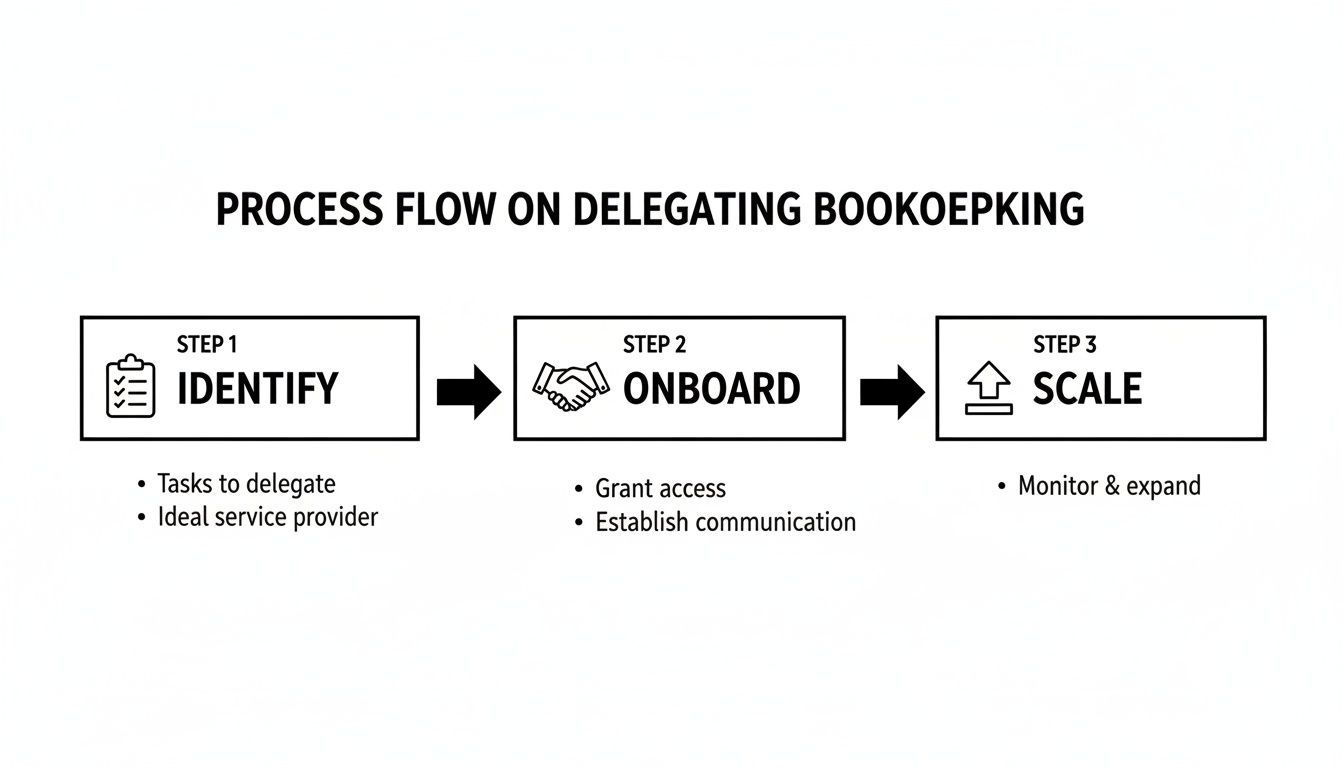
Delegating bookkeeping is a fast path to reclaiming hours and ensuring financial accuracy. Following a structured process removes guesswork and builds a system that frees you to focus on strategy, not spreadsheets.
- Task selection: Start small. Identify 3–5 recurring, time-consuming tasks that don't require strategic decisions. Good candidates include monthly bank reconciliation, categorizing expenses in [Tool], and sending client invoices.
- Task briefing: Create a one-page "Task Brief" for each delegated item. Vague instructions lead to poor outcomes. Your brief must clearly define the goal, required inputs, tools, and what "done" looks like to eliminate ambiguity.
- Access/security: Never share primary login credentials. Use a password manager like LastPass or 1Password to grant access securely. Apply the principle of least privilege: create a separate user account in your accounting software with limited, role-based permissions.
- Onboarding week (and beyond): A structured first month is critical for success.
- Week 1: Hold a kickoff call, review the first task brief together, and establish a communication rhythm. The goal is for your virtual assistant to successfully complete one core recurring task.
- Week 2: Introduce the next 1–2 tasks. Review the previous week's work, provide feedback, and begin co-creating a Standard Operating Procedure (SOP) document.
- First 30 days: The VA should now handle the initial tasks with minimal oversight. Shift focus to refining SOPs and identifying opportunities for them to take more ownership.
- Cadence/communication: Establish a clear communication schedule to prevent misunderstandings. A 15-minute weekly sync call and a brief daily asynchronous update via Slack or email is an effective rhythm that avoids excessive meetings.
- QA/feedback: Implement a simple quality assurance (QA) process, especially in the first 30 days. This isn't micromanagement; it's a way to ensure accuracy and provide coaching. A quick spot-check of categorized expenses or reconciled accounts helps catch small errors before they become habits.
- Scaling the relationship: Once your assistant masters the initial tasks, expand their responsibilities. Delegate related activities like managing accounts payable, following up on overdue invoices, or preparing monthly financial summary reports to increase your ROI.
Delegation assets (templates + scripts)
Clarity is non-negotiable when delegating financial tasks. These copy-and-paste assets are designed to remove guesswork and create a system of record for your core bookkeeping processes.
Task Brief Template: Monthly Expense Categorization
- Goal: Accurately categorize all business transactions from the previous month in QuickBooks Online to ensure our financial reports are correct.
- Definition of Done: All transactions from the primary business checking and credit card accounts for [Date Range] are assigned to the correct expense category per our Chart of Accounts. The reconciliation summary report is saved in the shared drive.
- Inputs/Links: Link to Chart of Accounts guide. Read-only access to bank statements.
- Tools: Access to QuickBooks, Slack for questions, and our 1Password vault for credentials.
- Constraints: Do not categorize any single transaction over $[Amount] without my approval. Flag any suspected personal expenses and assign them to the "Owner's Draw" category.
- Examples: Link to last month’s completed reconciliation report.
- Deadline: To be completed by the 5th business day of each month.
- Escalation rules: If you are unsure how to categorize a transaction, tag me in a comment directly within [Tool] for a quick review.
SOP / Checklist Template: Bank Reconciliation
- Log in to Xero.
- Navigate to Accounting > Bank Accounts.
- Select the primary business checking account.
- Open the corresponding bank statement for last month in a separate tab.
- Match each transaction from the bank feed to the entries in Xero.
- For any discrepancies, leave a comment on the transaction and tag me.
- Verify that the final balance in Xero matches the closing balance on the bank statement.
- Generate the official Reconciliation Report.
- Save the report as a PDF in our shared drive under
Financials > Reconciliations. - Post a confirmation message in our shared Slack channel that the task is complete.
Communication Cadence Template
- Daily Check-in (Asynchronous): A brief message in Slack by 10 AM [Client's Timezone] outlining top 1–2 priorities for the day.
- Weekly Sync (Live): A 15-minute call every Monday to review the previous week, set priorities for the current week, and resolve any roadblocks.
- Async Communication: Use Slack for urgent questions. Use email for non-urgent matters that require a more detailed response.
What to delegate task list
Here is a list of common bookkeeping tasks ideal for a virtual assistant. Many of these rely on strong data entry skills.
- Categorize monthly expenses
- Reconcile bank and credit card accounts
- Create and send client invoices
- Follow up on overdue invoices (collections)
- Process vendor bills for payment
- Manage accounts payable schedule
- Record and apply customer payments
- Update customer/vendor information in accounting software
- Prepare a weekly cash flow summary report
- Digitize and file receipts and financial documents
- Generate monthly Profit & Loss statements
- Generate monthly Balance Sheet reports
- Prepare basic expense reports for team members
- Track and process employee expense reimbursements
- Assist with cleaning up the Chart of Accounts
Measurement & ROI
How do you know if delegating your bookkeeping is truly working? Beyond feeling less stressed, tracking a few simple metrics ensures you're getting a clear return on investment (ROI).
Suggested KPIs
Key Performance Indicators (KPIs) help you measure success objectively. For outsourced admin support, focus on efficiency, accuracy, and autonomy.
- Hours saved per week: The most direct measure of reclaimed time you can now spend on high-value activities.
- Task turnaround time: How long it takes to complete recurring tasks, like month-end reconciliation. This should become faster and more predictable over time.
- % tasks done without rework: A key indicator of quality. Aim for 95%+ accuracy after the first 30 days.
- Time-to-independence: How quickly your VA can execute their core tasks with minimal oversight. The goal is for this to happen within the first 30-45 days.
A simple ROI framing
Translate your saved time into financial value to see your virtual assistant as a strategic investment.
(Hours saved per week × Your hourly value) – VA cost = Net value gained
For example, saving 5 hours per week at an executive value of $150/hour creates $750 in strategic time. After subtracting the cost of support, the positive return becomes clear. You can explore our pricing options to get a better sense of costs.
30-day scorecard checklist
Use this checklist at the end of the first month to evaluate success and identify areas for improvement.
- Reliability: Were all assigned tasks completed on time without prompting?
- Accuracy: Was the work free of significant errors?
- Communication: Did the VA adhere to the agreed-upon communication cadence?
- Proactiveness: Did the VA ask clarifying questions upfront and suggest process improvements?
- Autonomy: Is the VA now handling at least 80% of their core tasks independently?
FAQs
Here are concise answers to common questions founders ask about outsourcing their bookkeeping basics for small business.
What tasks should I delegate first?
Start with high-volume, repetitive tasks that don't require strategic decisions. The best first tasks are typically monthly bank reconciliation, expense categorization, and sending out standard client invoices.
How do I give access securely?
Never share your primary logins. Use a password manager for credentials and create a separate user account for your assistant in your accounting software with limited, role-based permissions (the principle of least privilege).
What’s the difference between a virtual assistant and an executive assistant?
A virtual assistant (VA) often focuses on a broader range of remote administrative or specialized tasks. An executive assistant (EA) typically provides high-level, dedicated support directly to a senior leader, managing schedules, communications, and strategic projects.
Dedicated VA vs pooled team—what’s better?
A dedicated VA provides consistent, personalized support, learning your preferences and business over time. A pooled team offers flexibility and coverage but may lack the deep context of a single, dedicated resource. For core business functions like bookkeeping, a dedicated relationship is usually more effective.
How does onboarding work and how long does it take?
Onboarding typically takes 1-2 weeks. Our process at Match My Assistant involves a kickoff call to align on goals, providing access to tools, and walking through the first few tasks. By day 30, your VA should be operating with significant autonomy.
What happens if my assistant is unavailable?
One benefit of working with a managed virtual assistant agency is having built-in backup. If your primary assistant is sick or on vacation, we can provide a trained backup to ensure your critical tasks are still completed without interruption.
Is a VA better than hiring in-house for my situation?
For many small businesses, a VA is more cost-effective and flexible than a full-time in-house hire. It eliminates overhead like benefits and payroll taxes while providing access to specialized skills on a fractional basis.
Ready to reclaim your time and get your books in order with reliable, outsourced admin support? The team at Match My Assistant connects you with pre-vetted professionals who understand bookkeeping basics for small business. Talk to our team to get matched with the right support for your needs.