

To scale your construction company, the most direct path is delegating administrative tasks to a skilled assistant. This move frees up your project managers to focus on high-value work like winning bids and managing job sites, saving time, reducing costly errors, and ensuring smoother project execution. If you're a founder or manager drowning in paperwork while trying to grow, this guide provides a clear path to getting dependable support.
Summary (TL;DR)
- What to Do Next: Delegate 3-5 high-volume, low-risk administrative tasks to a vetted virtual assistant to immediately reclaim time for your project managers.
- What to Delegate: Start with document control (RFIs, submittals), subcontractor onboarding (COIs, contracts), invoice processing, and scheduling.
- What to Expect: In the first 30 days, a well-onboarded assistant should handle several recurring tasks independently, freeing up 5-10 hours of your team's time per week.
- Common Pitfalls: Avoid vague instructions, inadequate security (not using a password manager), and a lack of a structured onboarding plan.
- Quick Timeline: Expect to be matched with a vetted assistant in under a week and see them take over their first core tasks within the first 7-14 days.
Key Takeaways
- Focus on ROI, Not Cost: An admin assistant is an investment in leverage. The time saved by your high-value team members (like project managers) typically far outweighs the cost of support.
- Systemize Delegation: Use templates for task briefs and Standard Operating Procedures (SOPs) to ensure clarity and consistency. Don't delegate from your inbox.
- Onboarding is Everything: A structured 30-day plan is critical. The goal is to move the assistant from guided tasks to independent ownership of key processes.
- Security is Non-Negotiable: Use password managers, unique logins, and two-factor authentication (2FA) to grant access to systems securely.
- Virtual vs. In-House: A virtual assistant offers flexibility, specialized skills, and cost savings without the overhead of a full-time hire, making it ideal for growing firms.
Quick Answers
What's the best first task to delegate?
Start with a repetitive, rules-based task like organizing digital project files or tracking subcontractor insurance certificates (COIs).
How long does it take to onboard a virtual assistant?
With a clear plan, an assistant can handle their first few tasks within Week 1 and manage recurring duties independently within 30 days.
Is a virtual assistant more cost-effective than an in-house hire?
Yes, typically. A virtual assistant eliminates costs like benefits, payroll taxes, and office space, turning a fixed salary into a flexible operating expense.
Step-by-Step Playbook
Bringing a new administrative assistant into your construction company is more than just handing them a login and a to-do list. To get them up to speed and truly making an impact, you need a plan. This isn't about micromanaging; it's about setting them (and you) up for success from day one so they can start taking meaningful work off your plate, fast.
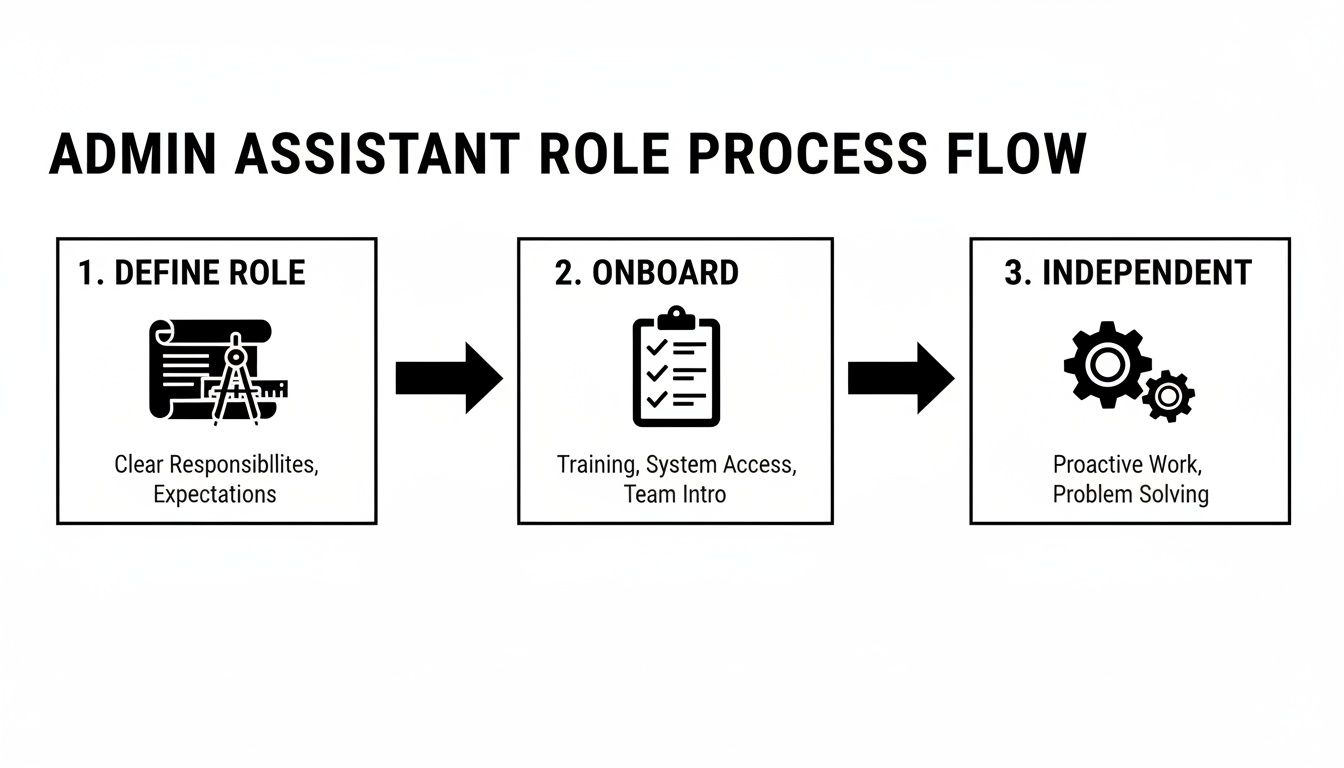
- Task Selection: Before they start, identify 3–5 high-priority, low-risk tasks that are bogging down your team. Good candidates are repetitive and easy to document, such as filing RFIs in Procore or matching subcontractor invoices to purchase orders.
- Task Briefing: For each initial task, create a clear, written brief. Define the goal, what "done" looks like, and provide all necessary links and examples. This eliminates guesswork.
- Access & Security: Grant system access securely. Use a password manager like LastPass or 1Password, create separate logins for an audit trail, and enforce Two-Factor Authentication (2FA). Adhere to the principle of least privilege—grant access only to what is essential.
- Onboarding Week: The first week sets the tone. A structured onboarding process is what builds a confident, capable team member.
- Week 1: Focus on introductions, communication rhythms, and tool orientation. Assign 1-2 small, well-defined tasks and provide detailed feedback.
- Week 2: The assistant should take over their first recurring task with minimal supervision. They should know who to ask for help and feel comfortable in your communication channels.
- First 30 Days: The assistant is now independently managing several key processes. Your time spent on direct supervision should be noticeably lower.
- Cadence & Communication: Establish a clear communication rhythm to stay aligned, especially with a remote assistant. Use a quick daily async check-in and a 15-minute weekly review meeting to discuss priorities and roadblocks.
- QA & Feedback: In the beginning, review every completed task. Provide specific, constructive feedback that explains the "why" behind your processes, not just the "what." This context is crucial for learning. For a deeper dive, check out our guide on how to manage remote teams.
- Scaling the Relationship: Once your assistant has mastered the initial tasks, begin layering in more complex responsibilities one at a time. Use the same brief-train-feedback loop to expand their role methodically.
Delegation Assets (Templates + Scripts)
Effective delegation relies on clear, standardized instructions. These templates provide your new admin assistant for a construction company with the framework needed to execute tasks correctly and consistently, reducing rework and saving you time.
Task Brief Template
- Goal: What is the "why" behind this task? (e.g., "Compile the HVAC submittal package for the [Maple Street] project so the architect can approve it before our Friday material order deadline.")
- Definition of Done: What does success look like? (e.g., "A single PDF containing all 8 required spec sheets is named '[ProjectName]HVAC_Submittal[Date]' and uploaded to the 'Submittals' folder in Buildertrend.")
- Inputs/Links: Provide direct links to all necessary files, folders, and logins.
- Tools: List the required software (e.g., Bluebeam, Google Sheets, Procore).
- Constraints: Note any budget limits, required vendor contacts, or deadlines.
- Examples: Link to a past example of a well-executed submittal package.
- Deadline: Provide a specific date and time.
- Escalation Rules: Clarify when to ask for help and who to contact.
SOP / Checklist Template: Subcontractor Onboarding
- Receive signed subcontractor agreement.
- Verify agreement is fully executed.
- Save agreement to:
[Project Folder] > Contracts > [Subcontractor Name]. - Check Certificate of Insurance (COI) against project requirements.
- If COI is valid, save to
... > Insurancesubfolder. - If COI is missing/expired, email the "COI Request Template."
- Add subcontractor contact info to the project directory in the company CRM.
- Send the "Welcome & System Login" email template.
- Update the Subcontractor Tracking Sheet status to "Onboarded."
- Notify the Project Manager via Microsoft Teams that the sub is ready for scheduling.
Communication Cadence Template
- Daily Async Check-in (via Slack/Teams):
- Top 3 priorities for today?
- Any roadblocks?
- Key tasks completed yesterday?
- Weekly Tactical Meeting (15-Minute Video Call):
- Review progress on weekly goals.
- Set/confirm priorities for the upcoming week.
- Discuss any process bottlenecks or improvements.
"What to Delegate" Task List
Here are 20+ specific tasks an admin assistant for a construction company can take on:
- Format and prepare bid proposal documents.
- Track the status of submitted bids and follow up as needed.
- Organize and file digital project documents (RFIs, change orders, permits).
- Manage and update the master project contact list.
- Schedule project meetings and send calendar invitations.
- Prepare and distribute meeting agendas and minutes.
- Coordinate with suppliers to confirm material delivery dates.
- Onboard new subcontractors (collecting COIs, contracts, W-9s).
- Track subcontractor insurance expiration dates.
- Match purchase orders to invoices for accounts payable.
- Enter project expenses into accounting software.
- Follow up on overdue client invoices.
- Prepare and send out monthly project progress reports.
- Manage the project manager’s calendar and schedule site visits.
- Monitor the main company email inbox and flag urgent messages.
- Update project timelines or Gantt charts with new information.
- Track permit application statuses with the local building department.
- Compile closeout documents at the end of a project.
- Order office or job site trailer supplies.
- Research potential new vendors or subcontractors.
- Assist with creating safety meeting documentation.
Measurement & ROI
How do you know if your investment in an admin assistant for a construction company is paying off? While feeling less overwhelmed is a great start, objective data demonstrates the true impact on your bottom line.
Suggested KPIs
Track these Key Performance Indicators (KPIs) to measure success:
- Hours Saved/Week: Ask your project managers to estimate the time they've reclaimed from admin tasks.
- Task Turnaround Time: Measure how long it takes to process routine items like RFIs or invoices.
- % Tasks Done Without Rework: A high first-pass success rate indicates clear processes and an attentive assistant.
- Time-to-Independence: How quickly does the assistant learn to manage new tasks with minimal oversight?
- Backlog Size: Are administrative backlogs (like unprocessed invoices or unfiled documents) shrinking?
A Simple ROI Framing
The Return on Investment (ROI) calculation puts a dollar value on reclaimed time:
(Hours Saved × Hourly Value of Leader's Time) – VA Cost = Net Gain
For example, if an assistant saves a project manager (valued at $75/hour) 10 hours per week, you've reclaimed $750 in productive capacity. Subtract the assistant's cost to see your positive ROI. This is the core value proposition of our virtual assistant services.
30-Day Success Scorecard Checklist
Use this simple checklist at the 30-day mark to evaluate progress:
- Document Control: Files are consistently named and stored correctly.
- Communication: Assistant proactively provides updates without prompting.
- Process Adherence: SOPs and checklists are followed accurately.
- Tool Proficiency: Comfortable navigating key software (Buildertrend, Procore).
- Response Times: Acknowledges requests and meets agreed-upon deadlines.
- Initiative: Attempts to solve minor problems before escalating.
FAQs
What tasks should I delegate first?
Start with high-volume, low-risk tasks that are easy to document. Good first tasks include organizing digital project files, updating subcontractor contact lists, and matching purchase orders to invoices. This builds trust and momentum before moving to more complex duties.
How do I give access securely?
Never share your own passwords. Use a password manager like LastPass or 1Password to grant access, create separate user logins for each platform whenever possible, and enforce two-factor authentication (2FA). This ensures a secure process with a clear audit trail.
What’s the difference between a virtual assistant and an executive assistant?
A Virtual Assistant (VA) typically handles a broader range of administrative and specialized tasks remotely for multiple clients. An Executive Assistant (EA) usually works exclusively for one or a few senior leaders, focusing more on strategic calendar management, communication, and gatekeeping.
Dedicated VA vs. pooled team—what’s better?
A dedicated VA works with you consistently, learning your business, processes, and preferences for a truly personalized partnership. A pooled team offers broader availability but lacks the deep contextual knowledge a dedicated resource provides. For the specific needs of a construction company, a dedicated VA is almost always more effective.
How does onboarding work and how long does it take?
Our onboarding is a structured process focused on rapid integration. We help you define the first tasks, establish communication rhythms, and set up secure access. A new assistant typically handles their first tasks within days and can manage core recurring duties independently within the first 30 days.
What happens if my assistant is unavailable?
One of the benefits of working with a managed virtual assistant agency like Match My Assistant is our satisfaction guarantee and backup support. If your dedicated assistant is sick or on vacation, we have systems in place to ensure your critical tasks are still covered, preventing workflow interruptions.
Is a VA better than hiring in-house for my situation?
For many growing construction firms, a VA is a more strategic choice. It provides access to specialized talent without the high fixed costs, benefits, and overhead of a full-time employee. The flexibility to scale support up or down based on project load is a significant advantage over a rigid in-house hire.
At Match My Assistant, we connect busy construction professionals with vetted, industry-savvy virtual assistants who can get work off your plate without the churn of random freelancers. Our clear onboarding process and satisfaction guarantee provide the consistency and trust you need. To learn more about our flexible support options, talk to our team.